Puzzle books on an e-reader: crossword, sudoku and logic puzzle PDFs fitted to the Kindle Scribe and reMarkable
A puzzle PDF is a print object: a grid sized for a newspaper column or a paperback, clues in seven-point type, margins the printer left. Open it on a Kindle Scribe or a reMarkable and the whole page shrinks to fit, so the sudoku cells are too small for a pen stroke and the crossword clues are a grey smear. The PDF is not broken. It was laid out for paper, and the reader is doing exactly what it was told.
↑ Upload and configure in our Studio
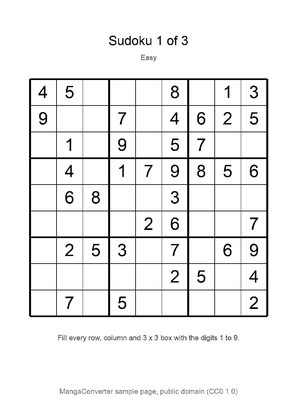
Sudoku sampler, MangaConverter, typeset by the MangaConverter team, public domain
This converter treats each page of the puzzle book as an image and rebuilds it for the exact panel you own. It trims the white margins so the grid fills the screen, upscales a page that is smaller than the panel so the cell lines stay crisp, and writes a PDF the pen devices open natively: the Kindle Scribe, the reMarkable 2 and Paper Pro and the Kobo Elipsa all write directly on a PDF, so a converted puzzle page is one you fill in with the pen. EPUB, KEPUB and CBZ are there too, for reading rather than writing.
Honest scope first: this site does not sell puzzles and does not supply any. It fits a puzzle PDF you already own, from a newspaper subscription, a puzzle publisher’s download, a book you scanned or a generator you ran, to the device in your hand. The three sudoku pages on the wall above are our own, made for this page and public domain. The fitting runs in the browser, free, with a live preview before anything converts.
- Files auto-delete after 24 hours
- No install, runs in any browser
- Free to use
- The genuine open-source KCC engine
How to fit a puzzle PDF to a Kindle Scribe or reMarkable
Drop in the PDF
A puzzle book PDF, a single newspaper crossword page or a scan all work, up to 1GB and 1000 pages per file and 20 files per batch, so a month of daily crosswords goes in at once. A folder of page images zipped up, or a CBZ, is accepted too.
Margins and upscaling are already set
This page presets margin cropping with page-number trimming and an upscale pass for pages smaller than the panel, with left-to-right page order. Manga mode is off, so nothing reads right to left. Contrast levelling is left off on purpose: a printed grid is already black on white, and a level pass can thin the light shading some crosswords use for themed squares; switch it on in the advanced options for a faint scan.
Pick your device and choose PDF
A Kindle Scribe profile is preselected as a starting point; pick your model from the list, or Custom conversion with the panel’s pixel size for a Boox. Then choose PDF as the output format: on a Scribe the pen writes on a PDF but only attaches sticky notes to an EPUB, and the reMarkable and the Elipsa write on PDFs too. The reMarkable profiles default to PDF already.
Check the preview, convert, download
The preview renders real pages at the device size, which is the moment to confirm a sudoku cell is big enough for a digit and the clue type is legible. Convert, then download the PDF or pick it up on the reader from your Reader Shelf over Wi-Fi. Files auto-delete after 24 hours.
Which pen devices work for puzzle PDFs, by brand
| Device | Profile in the picker | Screen | Recommended output |
|---|---|---|---|
| Kindle Scribe (any generation) | Kindle Scribe 1/2, Kindle Scribe 3, Kindle Scribe Colorsoft | 10.2 inch, 1860 x 2480 or 1986 x 2648 pixels | PDF, delivered by Send to Kindle, the Reader Shelf or USB; the pen writes on the page |
| reMarkable 2, Paper Pro and Paper Pro Move | A profile per model | 10.3, 11.8 and 7.3 inch | PDF by default, loaded through the reMarkable app; the pen writes on the page |
| Kobo Elipsa and Sage | Kobo Elipsa, Kobo Sage | 10.3 and 8 inch | PDF over USB or from the Reader Shelf in the Kobo browser; the Kobo Stylus writes on the page |
| Boox and other Android pen tablets | Custom conversion | Type the panel’s pixel width and height | PDF, downloaded in the device’s own browser from the Reader Shelf; the pen writes in the Boox reader |
| Any reader without a pen | Your model’s profile | Readable, not writable | EPUB or KEPUB for solving in your head, or the grid on a 6 inch screen for a quick look |
What this cannot do
No puzzles: this page fits a PDF you bring, it does not supply one. No answer checking, no interactive grid, no pen on an EPUB (a Scribe attaches sticky notes to an EPUB; choose PDF to write on the page), and no magic on a 6 inch panel: a newspaper crossword cropped to the grid is readable on a Paperwhite, it is not writable there because there is no pen.
Margins are where the cell size goes
A puzzle book’s margins can eat a quarter of the page, which on a pen device is a quarter of your cell size. Trimming them before the page is sized to the screen is most of why a converted puzzle page gives the pen so much more room than the raw PDF, and the preset here trims the page numbers along with the border.
PDF out, for the pen
Every other page on this site leads with EPUB because reading is the point. Here the point is writing, and the pen devices write on PDFs: choose PDF in the output format before you convert. The reMarkable profiles already default to it.
Frequently asked questions
Can I do crossword puzzles on a Kindle Scribe?
Yes, with the pen on a PDF. The Scribe writes directly on PDF pages, so a crossword PDF fitted here, with the margins cropped and the grid rebuilt at the Scribe’s 1860 x 2480 pixels, opens as a page you fill in. Send it with Send to Kindle as a PDF or pick it up from the Reader Shelf. An EPUB on a Scribe takes sticky notes only, which is why this page points you at PDF output.
Does sudoku work on a reMarkable 2?
Well, and it is the device most people ask about for exactly this. Choose the reMarkable 2 profile (1404 x 1872 pixels) and the output is a PDF by default; load it through the reMarkable app and the pen writes in the cells. A paperback sudoku page cropped to the grid fills most of the 10.3 inch screen, which gives each cell about a centimetre.
Where do I get the puzzles?
Not here; this site converts files and sells no puzzles. Newspaper subscriptions usually offer the daily crossword as a printable PDF, puzzle publishers sell PDF books, a scanned puzzle book works as a PDF or a ZIP of page images, and free sudoku and logic puzzle generators output PDFs. Whatever you have the right to print, you can fit to your device here.
Will the grid lines and the small clue type stay sharp?
The page is rebuilt at the panel’s own pixel count rather than downscaled by the device, and a page smaller than the panel is upscaled with a proper resampling filter before it is written, so cell lines stay a clean black. The live preview shows the real pixels before you commit; if the clue type is still too small on a 6 inch reader, the grid and the clues are better split across two pages in the original PDF than shrunk here.
Can I erase and redo an answer?
That is the device’s pen layer, not the file: on a Scribe, a reMarkable or an Elipsa the pen strokes sit on top of the PDF page and erase like any other note. The converted PDF underneath is unchanged, so a wrong answer costs one eraser stroke, and a finished puzzle book is a clean PDF again if you clear the notes.
Page extraction, cropping and upscaling run on Kindle Comic Converter (KCC), the open-source engine built for putting image-based pages on e-readers. That the pages hold grids rather than panels changes nothing about the work, which is why the fit is honest. Hosted here with a live preview, no install.
Free, margins cropped, grid upscaled, PDF for the pen