TTRPG rulebooks on an e-reader: D&D and Pathfinder PDFs rebuilt for Kindle Scribe, Kobo Elipsa, reMarkable and Boox
A rulebook PDF is a print object: letter size, two columns, an inch of margin on the outside edge for the binding and the art. Open it on an e-reader and the whole page shrinks to fit, so the stat block you need mid-combat is six-point grey and you are pinching and zooming while the table waits. The PDF is not broken. It was laid out for paper, and the reader is doing exactly what it was told.
↑ Upload and configure in our Studio
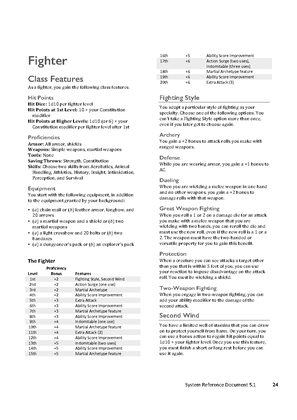
System Reference Document 5.1, Wizards of the Coast LLC, typeset by the publisher, CC BY 4.0
This converter treats each page of the rulebook as an image and rebuilds it for the exact panel you own. It trims the white margins so the two columns fill the screen, lifts the contrast so small type and table rules survive e-ink grey, upscales a scanned page that is smaller than the panel, and writes a file the device opens natively: EPUB for a Kindle, KEPUB for a Kobo, PDF for a reMarkable, or CBZ if you want the cleaned page images for another app. On a 10 to 13 inch reader, the Scribe, Elipsa, reMarkable or Boox class, a core rulebook reads like the printed book held at arm’s length. On a 6 inch reader it is at least a page you can read without zooming.
Honest scope first: this is for rulebooks, modules and character sheets you already hold as a PDF or as page images, from the publisher’s own store or a free SRD. It does not make the text searchable, it does not build a table of contents, and it does not roll dice. What it does is the part that makes a rulebook legible on e-ink, and it does that in the browser, free, with a live preview before anything converts.
- Files auto-delete after 24 hours
- No install, runs in any browser
- Free to use
- The genuine open-source KCC engine
How to convert a TTRPG rulebook for an e-reader
Drop in the PDF
A publisher PDF and a scanned one both work, up to 1GB and 1000 pages per file and 20 files per batch, so a core rulebook, a bestiary and an adventure module go in together. A folder of page images zipped up, or a CBZ, is accepted too.
Margins, contrast and upscaling are already set
This page presets margin cropping with page-number trimming, an auto-level pass that pushes e-ink greys towards black and white, an upscale pass for scans smaller than the panel, and left-to-right page order. Manga mode is off, so nothing reads right to left. Colour is off by default, which is what a greyscale panel shows anyway; a Colorsoft or Kobo Colour owner switches it on in the advanced options.
Pick your device
A Kindle Scribe profile is preselected as a starting point. Every current Kindle, Kobo and reMarkable has its own profile that builds pages for that panel’s exact pixel count, so pick your model from the list. For a Boox, a PocketBook or any reader not listed, choose Custom conversion and type the panel’s width and height in pixels.
Check the preview, convert, download
The preview renders real pages at the device size, which is the moment to confirm a stat block’s smallest line is still legible. Convert, then download the file or pick it up on the reader from your Reader Shelf over Wi-Fi. Files auto-delete after 24 hours.
Which e-readers work for TTRPG rulebooks, by brand
| Device | Profile in the picker | Screen | Recommended output |
|---|---|---|---|
| Kindle Scribe (any generation) | Kindle Scribe 1/2, Kindle Scribe 3, Kindle Scribe Colorsoft | 10.2 inch, 1860 x 2480 or 1986 x 2648 pixels | EPUB, delivered by Send to Kindle, the Reader Shelf or USB; PDF if you want to write on it with the pen |
| Kobo Elipsa and Sage | Kobo Elipsa, Kobo Sage | 10.3 and 8 inch | KEPUB, copied over USB or downloaded from the Reader Shelf in the Kobo browser |
| reMarkable (any model) | A profile per model, reMarkable 1, 2 and Paper Pro | 10.3 to 11.8 inch depending on the model | PDF, loaded through the reMarkable app; you can write on it |
| Boox, PocketBook and other Android readers | Custom conversion | Type the panel’s pixel width and height | EPUB or PDF, downloaded in the device’s own browser from the Reader Shelf |
| Kindle Colorsoft, Kobo Clara Colour and Libra Colour | Your model’s profile, with colour switched on | 6 to 7 inch colour e-ink | The brand’s native format, art and coloured headers kept |
What this cannot do
No searchable text in the converted file, no table of contents built from the PDF’s bookmarks, no dice roller, no character-sheet form fields, and no magic on a 6 inch panel: a two-column page that is small on paper stays small on a small screen, cropping only reclaims the margins. Where a device supports landscape, use it for a landscape-format map or spread.
Margins are where the legibility goes
Print margins on a rulebook can eat a quarter of the page, invisible on paper and expensive on a panel. Trimming them before the page is sized to the screen is most of why a converted rulebook reads so much larger than the raw PDF, and the preset here trims the page numbers along with the border.
Colour is a switch, not a default
Most e-ink panels are greyscale, so the output here is greyscale and smaller for it. If you read on a Kindle Colorsoft, a Scribe Colorsoft, a Kobo Clara Colour or Libra Colour, or a reMarkable Paper Pro, switch colour on in the advanced options before converting and the art and the coloured table headers come through.
Frequently asked questions
Can I read Pathfinder or D&D rulebooks on a Kindle?
Yes, and on a Kobo, a reMarkable or a Boox. A PDF opened directly on a Kindle shrinks to the page’s print proportions with its margins intact, which is why rulebooks are a notorious bad fit; converted with your model’s profile, each page is cropped to the two columns and rebuilt at the panel’s own pixel count, so the text fills the screen. Deliver it the way your reader likes: Send to Kindle or the Reader Shelf for a Kindle, USB or the Reader Shelf in the browser for a Kobo or a Boox, the reMarkable app for a reMarkable.
Which e-ink tablet is best for D&D at the table?
Any of the large ones. The Kindle Scribe (10.2 inch), the Kobo Elipsa (10.3 inch), the reMarkable 2 and Paper Pro (10.3 and 11.8 inch) and the 10 to 13 inch Boox tablets all hold a full rulebook page at a readable size once the margins are cropped. The Scribe and the reMarkable take a pen, so a converted PDF doubles as a place for initiative notes. This page does not pick a device for you; it builds the file for the one you own.
Can it be a digital DM screen?
It can hold the pages a DM screen holds. Convert the reference pages you look up most (conditions, actions in combat, the encounter you are running tonight) as their own short file, and keep it open beside the module. What it cannot do is search: the output is a book of page images, so you turn to the page rather than type the rule name. A bookmark or two on the device covers most of that.
Will the tables and stat blocks be sharp enough on e-ink?
Thin lines are the risk on e-ink: table rules and small type are a pixel wide on paper and a scanner turns them grey. The auto-level pass pushes those greys towards solid black, the upscale pass rebuilds a small scan at the panel’s pixel count rather than letting the device stretch it, and the live preview shows the real pixels before you commit, so you can judge the smallest line yourself.
Is this legal, and where do the PDFs come from?
Converting a PDF you own for your own reader is format shifting of your own copy; this page does not supply rulebooks and does not change who owns the file you upload. Publisher stores sell watermarked PDFs of the current D&D and Pathfinder books, and both games publish free rules references: the D&D SRD 5.1 is released under Creative Commons Attribution 4.0 and the Pathfinder 2e rules under the ORC licence. Files auto-delete here after 24 hours.
Page extraction, cropping, contrast and upscaling run on Kindle Comic Converter (KCC), the open-source engine built for putting image-based pages on e-readers. That the pages hold stat blocks rather than panels changes nothing about the work, which is why the fit is honest. Hosted here with a live preview, no install.
Free, margins cropped, contrast fixed, built for your panel